

How to Integrate Facebook Pixel in Odoo Website for eCommerce Conversion Tracking
If you’re using Odoo for your eCommerce website and want to improve your Facebook Ads targeting, integrating Facebook Pixel is essential. In this blog, we’ll walk you step-by-step through how to set up and configure Facebook Pixel in Odoo using the Website Sale Facebook Pixel module developed by Steigern Tech LLP.
Whether you’re a developer or store admin, this guide will help you quickly connect your Odoo website to Facebook Pixel to begin collecting valuable user behavior data.
Step 1: Install the Facebook Pixel Module for Odoo
To begin tracking customer activity on your Odoo website, first install the correct module.
✅ Follow these steps:
Go to the Odoo Apps Store page for Website Sale Facebook Pixel.
Download the module and upload it into your Odoo instance.
Activate Developer Mode in Odoo:
Navigate to Settings > Activate the developer mode.
Go to Apps → Click the “Update App List”.
Search for website_sale_facebook_pixel_stg and click Install.
Step 2: Get Your Facebook Pixel ID
To connect your website to Facebook Pixel, you’ll need your unique Pixel ID from Meta.
🔧 Steps to generate your Pixel ID:
Log in to your Facebook Business Manager.
Navigate to Events Manager.
Create a new Pixel or use an existing one.
Copy the Pixel ID — you’ll need to paste this into Odoo.
Step 3: Configure Facebook Pixel in Odoo Website Settings
Now it’s time to plug your Facebook Pixel ID into the Odoo backend.
⚙️ Configuration steps:
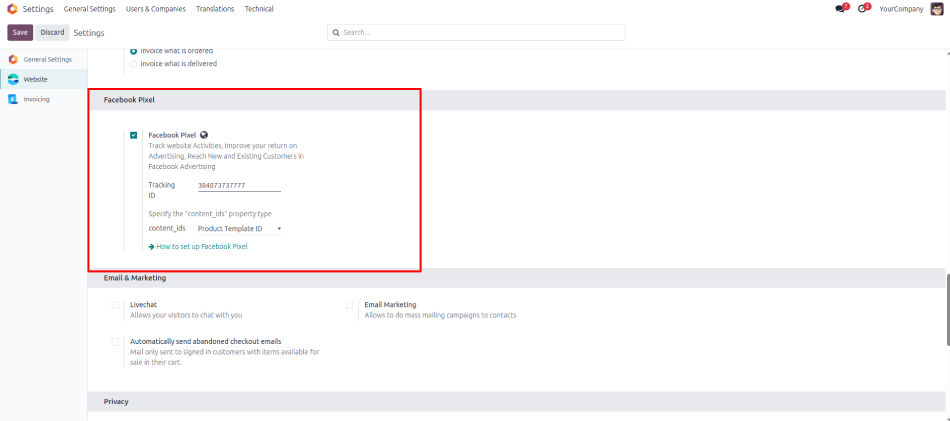
Go to Website → Configuration → Settings.
Scroll to the Facebook | Meta Pixel section.
Tick the checkbox to enable Facebook Pixel.
Paste your Pixel ID in the input field.
Click Save.
Step 4: What Events Are Tracked Automatically?
Once configured, this Odoo module will automatically fire important Facebook Pixel Events without needing any coding:
Event
Trigger
What’s Captured
PageView
On every page load
Page path
ViewContent
On product detail view
Product ID & Name
AddToCart
When a product is added
Product ID
Purchase
After successful checkout
Order ID, Total, Currency, Product details
Step 5: Verify Installation Using Meta Pixel Helper
To ensure everything is firing correctly, test the setup.
🔍 Steps:
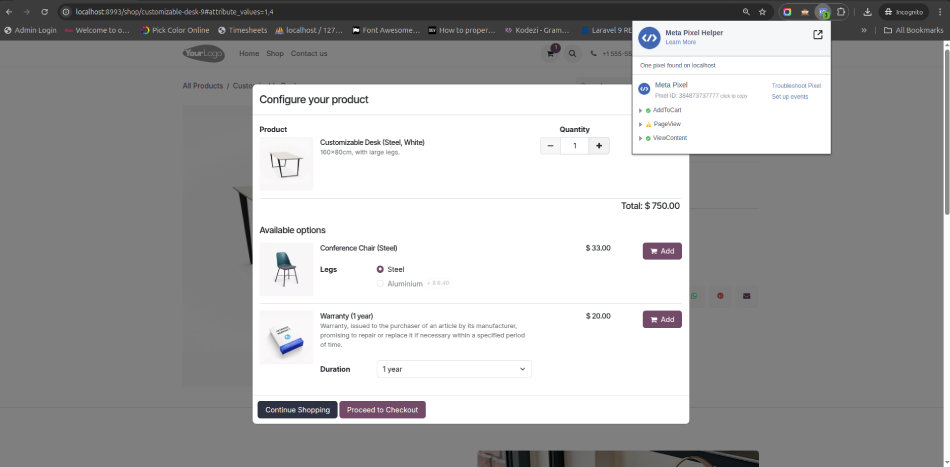
Install the Meta Pixel Helper Chrome extension.
Open your Odoo eCommerce website in Chrome.
Click the extension icon and see all fired events.
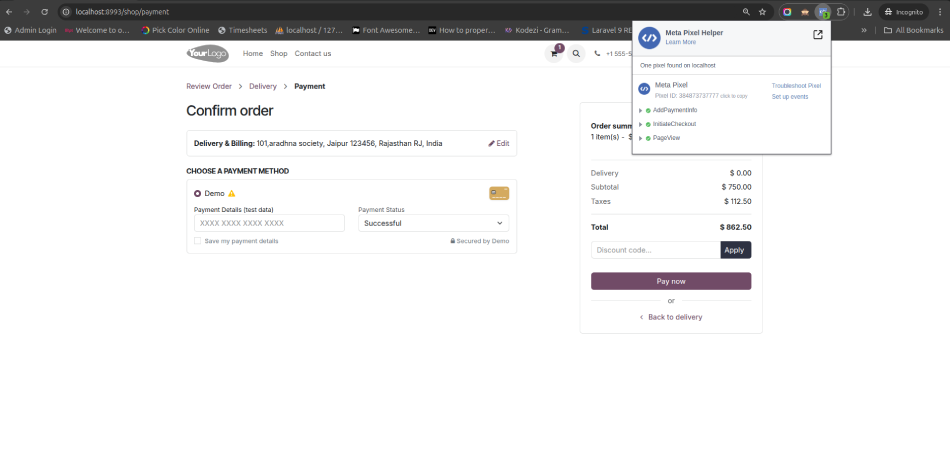
Confirm events like PageView, ViewContent, AddToCart, and Purchase are listed.
Step 6: Use Pixel Data for Facebook Ads Optimization
Once events are live, return to Facebook Ads Manager and:
Build Custom Audiences using Pixel data.
Set up Conversion Campaigns based on Purchase events.
Use Dynamic Retargeting Ads for abandoned carts.
This data gives you powerful tools to scale your eCommerce store in Odoo through optimized marketing strategies.
Why Integrate Facebook Pixel with Odoo?
Facebook Pixel is a powerful analytics tool that enables businesses to understand customer behavior on their websites. By integrating it with your Odoo website, you can: https://apps.odoo.com/apps/modules/18.0/website_sale_facebook_pixel_stg
Track User Interactions: Monitor actions such as page views, product views, add-to-cart events, and purchases.
Optimize Ad Campaigns: Use collected data to refine Facebook ad targeting and improve return on investment.
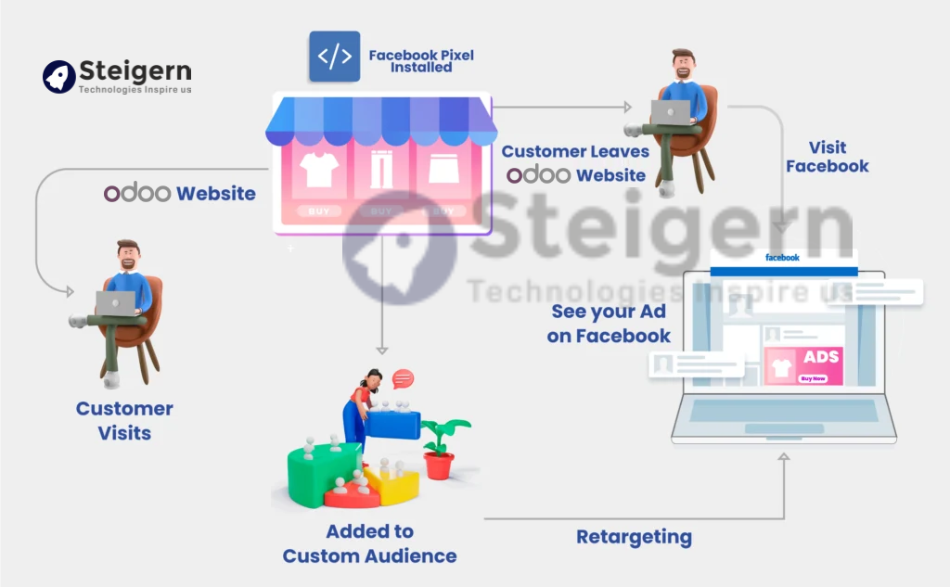
Retarget Visitors: Reach out to users who have interacted with your site but haven’t converted, encouraging them to return and complete their purchases.
Gain Insights: Analyze user behavior to make informed decisions about product offerings and marketing strategies.
Key Features of the Module
Following of facebook pixel for odoo website

Multiple Pixels for your multiple ads
Facebook Pixel module for Odoo website helps to better understand campaign performance. You can see exactly which campaigns drive specific conversions and website actions for Odoo website.

Internal Logging supported
We have added internal logging of Facebook Pixel tracking events, the data can be analyzed in convenient for your business way, and extend your company’s analytics capabilities using Facebook pixel for odoo

Advanced Matching
You can able to activate and configure Advanced Matching for this Facebook Pixel integration. Customer information, added to tracking events, will help to provide relevant ads through Facebook Ads Manager.

Very Easy and Configuration
We have implemented this Facebook pixel setup in few clicks, and backend setting option created for multiple Facebook pixel management in Odoo website.
Benefits for Your Business
Integrating Facebook Pixel with your Odoo website offers numerous advantages:
Enhanced Marketing Efficiency: By understanding user behavior, you can tailor your marketing strategies to target specific audiences effectively.
Improved Conversion Rates: Retargeting visitors who didn’t convert on their first visit can lead to increased sales.
Data-Driven Decisions: Access to detailed analytics allows for informed decisions regarding product offerings and promotional campaigns.
Optimized Ad Spend: By focusing on audiences more likely to convert, you can make better use of your advertising budget.
Final Thoughts
The Website Sale Facebook Pixel Module for Odoo provides a simple and effective way to:
Track user actions,
Understand customer journeys,
Improve marketing ROI,
And boost eCommerce sales with Facebook Ads.
It’s a must-have module for any Odoo eCommerce store aiming to grow through smart marketing.
Conclusion
The “Facebook Pixel in Odoo Website” module is an invaluable tool for businesses looking to enhance their eCommerce capabilities. By providing detailed insights into user behavior and enabling targeted marketing strategies, it helps businesses optimize their online presence and drive sales. Whether you’re aiming to understand your customers better, improve conversion rates, or make data-driven marketing decisions, integrating Facebook Pixel with your Odoo website is a step in the right direction.
Topics covered in this teardown:
Trending Topics
Related Articles
Shopify Odoo Connector: The Complete Guide to Seamless Shopify Odoo Integration
Jul 2026
HeyLight Buy Now, Pay Later in Odoo: Maximize eCommerce Conversions
Apr 2026

AI Policy: The Game Changer for Modern Developer Teams
Jul 2026
Send us a message
We'd love to hear from you
Yes, I am OK to receive further communication over my details shared here. Refer Privacy Policy for more info.
Related Engineering Insights
How to Integrate Google Shopping with Odoo Website
Promote your Odoo eCommerce products directly on Google Shopping. Learn how to generate automated XML product feeds, connect with Google Merchant Center, and drive qualified buyer traffic with zero manual listing upkeep.
User Activity Monitoring & Audit Logs in Odoo: Enterprise Security Guide
How to track, monitor, and audit sensitive user activities across Odoo ERP. Prevent unauthorized data exports, detect privilege abuse, and maintain strict SOC 2 and ISO 27001 compliance with Steigern Tech's Audit Logs module.
RAG vs MCP vs AI Agents: Which Is Best to Automate Your Business?
No single one is 'best'. RAG makes AI know your business, MCP connects AI to your software, and AI Agents let AI do the work. The businesses getting real results use them together, in that order.
Ready to engineer your system with production discipline? Talk to our lead architects.
Our senior engineers review your requirements, design the technical roadmap, and deploy dedicated squads tailored to your tech stack.